Supervertaler's voice command system just got better: meet SuperVoice!
विषय पोस्ट करनेवाला व्यक्ति: Michael Beijer
Michael Beijer
Michael Beijer  Identity Verified
यूनाइटेड किंगडम
Local time: 11:39
सदस्य
डच से अंग्रेजी
+ ...
Sep 26

Hi guys,

I've done a lot of work recently on the voice command system in Supervertaler for Trados, and I'd love for you to try it out. I've documented it in the help system at https://docs.supervertaler.com/trados/voice-commands/

In a nutshell, Supervertaler for Trados already had a pretty comprehensive voice-command system that let you control all sorts of
... See more
Hi guys,

I've done a lot of work recently on the voice command system in Supervertaler for Trados, and I'd love for you to try it out. I've documented it in the help system at https://docs.supervertaler.com/trados/voice-commands/

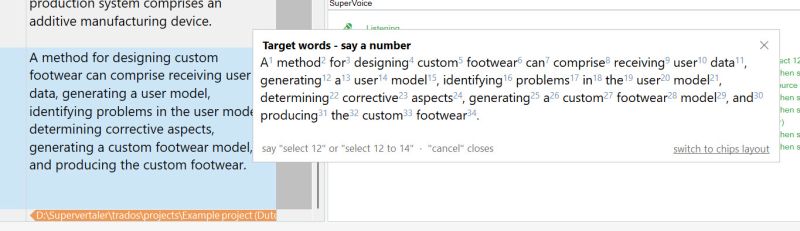
In a nutshell, Supervertaler for Trados already had a pretty comprehensive voice-command system that let you control all sorts of things in Trados Studio by voice. I have now created something similar to the old Select-and-Say in Dragon NaturallySpeaking, which those of you who used Dragon will probably know about. It refers to the ability to select words by voice. For technical reasons I won't go into now, it's difficult to select any word you want by voice, especially when multiple languages are involved. I therefore designed a system where the user can select ANY word they want in the source or target box in Trados Studio by simply saying "source numbers" or "numbers". This calls up a dialogue that shows the text in the source or target box, numbered. Saying a particular number selects a particular word. It's actually a very simple solution to a complex problem.

If you still don't know what I'm talking about, you can see it in action here: https://www.youtube.com/watch?v=bsNljeAqtrU

Michael

Supervertaler-for-Trados_SuperVoice-select-by-number

PS: I've also redesigned the Supervertaler website https://supervertaler.com/
▲ Collapse


To report site rules violations or get help, contact a site moderator:

इस मंच के मध्यस्थ
Michael Beijer[Call to this topic]

You can also contact site staff by submitting a support request »

Supervertaler's voice command system just got better: meet SuperVoice!


Pastey
Your smart companion app

Pastey is an innovative desktop application that bridges the gap between human expertise and artificial intelligence. With intuitive keyboard shortcuts, Pastey transforms your source text into AI-powered draft translations.

Find out more »
Trados Studio 2022 Freelance
The leading translation software used by over 270,000 translators.

Designed with your feedback in mind, Trados Studio 2022 delivers an unrivalled, powerful desktop and cloud solution, empowering you to work in the most efficient and cost-effective way.

More info »