ProZ.com frequently asked questions


ProZ.com Events

Main

  • 1 - ProZ.com Events: general

  • 1.1 - Can I post information about a translation industry event?

    Yes, but only once, and in the dedicated forum for event announcements.

    Additional announcements (i.e. "reminder", "final call") are not allowed.

    Events should not be announced anywhere else in the forums. An exception is allowed for non-English forums; an event may be posted once, in one non-English forum.


  • 1.2 - प्रोज़.कॉम पेशेवरीय प्रशिक्षण सत्र क्या हैं?

    प्रोज़.कॉम पेशेवरीय प्रशिक्षण सत्र एक सेमिनार है जो अनुवादकों, दुभाषियों और भाषा उद्योग के अन्य लोगों को पेशेवरीय प्रशिक्षण प्रदान करता है। अपने क्षेत्र में प्रमाणित विशेषज्ञता वाले पेशेवरों के द्वारा 1 से 2 दिनों तक चलने वाले इन सत्रों को संचालित किया जाता है।


  • Main - Top


  • 2 - प्रशिक्षकों को कैसे चुना जाता है? क्या मैं प्रोज़.कॉम प्रशिक्षक हो सकता हूँ?

    प्रोज़.कॉम के प्रशिक्षकों को संबंधित क्षेत्र में उनकी विशेषज्ञता और प्रशिक्षक के रूप में उनके पिछले अनुभवों के आधार पर चुना जाता है। अगर आप प्रोज़.कॉम के ऐसे सदस्य हैं जिसे किसी क्षेत्र में गहन अनुभव हो, दूसरों के साथ अपना अनुभव साझा करने की उत्कंठा हो और प्रशिक्षक या शिक्षक के रूप में अनुभव प्राप्त हो, तो आप भुगतानप्राप्त प्रशिक्षक के रूप में इस कार्यक्रम में भाग लेने के लिए योग्य हो सकते हैं। अधिक जानकारी के लिए, प्रशिक्षण समन्वयक से संपर्क करें।


  • 3 - ProZ.com training and events - general information

  • 3.1 - What payment methods are available? Why has my status not changed yet?

    All payment methods are available (credit card, Paypal, 2CheckOut, Moneybookers, wire transfer in USD or EUR). You will be able to select your payment method in the second stage of the payment process. Also, for some countries, local payment will be available. When paying in local currency (other than EUR and USD), the price of the session will be the course price equivalent in the local currency at the exchange rate of the day of the transaction ( www.xe.com/ucc will be used as a source).

    If you want to pay by wire transfer, choose either "Wire Transfer" (for transfers in USD) or "Wire Transfer (Euros)" from the payment method selection page. Click "Next" to receive your confirmation invoice and detailed account information and instructions on how to make the type of wire transfer you have chosen. Important: You should allow up to two weeks for your wire transfer to be fully processed.

    Your status will be updated when confirmation of the payment is entered by the payment system or the Local Payment Contact, depending on the payment method you choose. In the case of local payment, it may take some time for notifications to be sent and processed. If you are not listed after more than three days after you believe your payment should have arrived, please contact the Training session coordinator. When you buy a seat at a training session, you will be emailed an electronic invoice.


  • 3.2 - What is the cancelation policy for ProZ.com training sessions?

    ProZ.com workshops and self-paced courses come with a 7-day no questions asked, money back guarantee. In case of paid live sessions (webinars, workshops, meetups) the cancellation can made no later than 72 hours before the live event is due to start. Cancellations must be requested via support request at http://www.proz.com/support.


  • 3.3 - In which currency can I pay for a training session ?

    All ProZ.com online training fees are available in USD and Euro, but only ProZ.com members in EU member states that have adopted the Euro (the Euro Zone) are charged in Euros.

    If you live outside the EU, or if you live in the EU and have a VAT number, you do not have to pay VAT. If you live in the EU but do not have VAT number, you will have to pay VAT. Find more information payment at http://www.proz.com/faq/4015#4015.

    Also, for some countries, payment in local currency is available. Please contact the Training session coordinator to learn more about this.


  • 3.4 - Why does ProZ.com sometimes charge VAT tax within the EU?

    (This question only affects members in Europe.)

    If, when purchasing a seat from within the European Union, a member does not supply a VAT number which can be verified online, ProZ.com is obliged by law to collect VAT tax against the purchase made, according to the VAT rate applicable in the country of the purchaser.

    If a VAT number is supplied, no VAT tax is charged.


  • 3.5 - मैं प्रोज़.कॉम का सदस्य हूँ। क्या मैं छूट के लिए पात्र हूँ?

    हाँ, पूर्ण सदस्यों (और "समुदाय" पेज के आंशिक सदस्यों) के लिए पंजीकरण शुल्क में छूट दी जाती है।


  • 3.6 - मैं प्रोज़.कॉम का छात्र सदस्य हूँ। क्या मैं छूट के लिए पात्र हूँ?

    हाँ। प्रोज़.कॉम छात्र सदस्यों के लिए आगे छूट दी जाती है। कुछ पाठ्यक्रमों में उपलब्ध सीटों की संख्या सीमित हो सकती है। पहले भुगतान करने के आधार पर सीटों का आबंटन किया जाएगा।


  • 3.7 - The training time is not suitable for me. Are there any other training sessions in my time zone?

    ProZ.com offers training from 8:00 GMT to 20:00 GMT, since most of the trainers are located in Europe. Please check the list of announced training sessions here, http://www.proz.com/training, as the timetables are usually rotated.

    Most of the webinars are recorded and webinars videos can be purchased at http://www.proz.com/translator-training/format/videos. A certificate of attendance can be issued upon training completion and as per your request. A certificate of attendance can be downloaded at http://www.proz.com/profile/?show_mode=standard#trainings


  • Main - Top


  • 4 - ProZ.com webinars

  • 4.1 - What is a ProZ.com webinar?

    Webinars at ProZ.com are online training sessions designed for translators and language professionals. They cover a wide range of topics, including language technology, business practices, localization, and more. Webinars can be live or recorded and are typically conducted via Google Meet.

    Free webinars led by developers of language solutions and other industry experts are also available. These sessions offer insights into modern technologies and tools used by professionals in the translation and localization industry. Stay updated by participating in these webinars.


  • 4.2 - Which are the system requirements to attend a ProZ.com online session?

    Optimal requirements are:

    High performance CPU, like the following and up: 11th Gen Intel i5 or i7. AMD 5000 series Ryzen 5 or 7. Apple Silicon M1.
    1080p camera.
    Graphics card with WebGL 2.0 support.


  • 4.3 - How can I book a place in a ProZ.com webinar?

    To book a webinar, click on the session name listed on the website, then click the 'Buy Now' button. After completing the payment, your registration status will be updated. You must have a ProZ.com profile and be logged in to complete the booking. If you don’t have a profile, you can create one for free in just a few minutes.

    Webinars at ProZ.com have three levels of access: they can be free for everyone, available at a regular price for non-members, or offered at a discounted price for Plus or Premium members. Some webinars are exclusively free for Plus members or Premium members. Premium members enjoy the most comprehensive free access to training sessions and exclusive content, including access to the AI Hub for translation professionals (AI Hub).

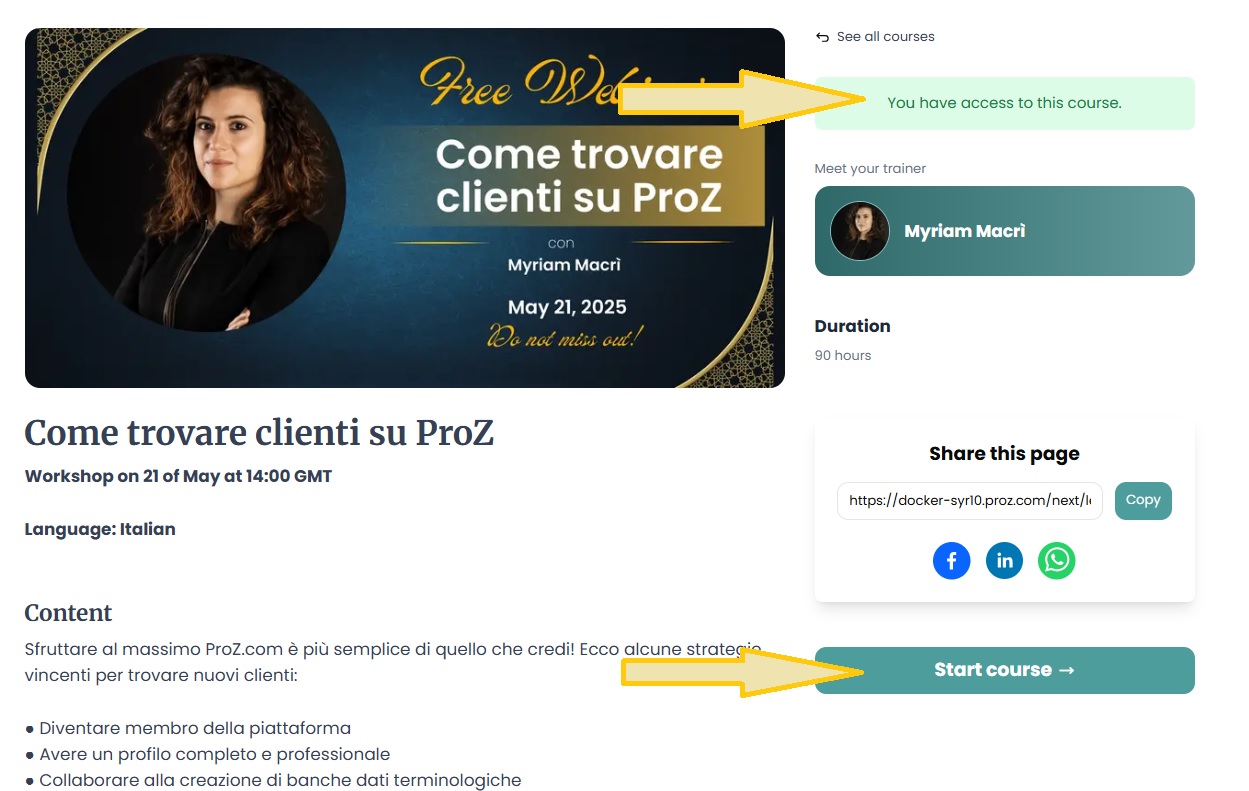
    To check your access level for a specific webinar, visit the training page. You will see a green note at the top of the page indicating access options. Click on the 'Start course' button to access training materials or the join link if the session is hosted on an LMS.


    Only after payment is received through the page or confirmed by Local payment contact your status will be changed to "registered and paid" and your place in the webinar will be confirmed. You can choose a payment method as suggested at http://www.proz.com/faq/3478#3478. Once your payment is processed, you will receive an invitation link to join the webinar at least 72 hours before the session. Check the system requirements and access information on the ProZ.com training page.

    Please remember that you need to have a profile and to be logged in to use that box. If you don´t have a profile, you can create one here (it´s free and will only take you five minutes) http://www.proz.com/?sp=r.


  • 4.4 - After I registered, how do I join the online session?


    At the time of the webinar, open the webinar confirmation email and click the Join Webinar link provided in the confirmation email. If prompted, click Yes, Grant or Trust to accept the download.

    Attendees' microphones will be muted by default and will be in listen only mode in order to limit background noise and improve the experience for all users.

    Join the audio portion of the webinar if you are using telephone to join the session. Audio information is provided in the Audio pane of your Control Panel and in the Webinar confirmation email.


  • 4.5 - How do I find out the time of a webinar in my location?


    All times are listed in GMT. To find your local time zone compared to GMT please visit - http://wwp.greenwichmeantime.com/info/current-time.htm


  • 4.6 - I don’t have a microphone can I still participate in a webinar?


    You do not need a microphone to participate. You will need speakers or a headset to listen, or you can dial in using a standard telephone (long distance rates may apply).

    Remember that all attendees will have their microphone’s muted and will be in listen only mode in order to limit background noise and improve the experience for all users. For more information just check the Training description and Virtual platform system requirements on the training page.


  • 4.7 - Will I have access to a recording of the session?

    Webinar sessions will be recorded. The video will be added to the training page on the LMS where you originally accessed the join link. You will receive an email notification once the recording is available.

    Videos will be accessible only to registered webinar attendees, and there is no limit on the number of times you can watch them. In some cases, additional materials used by the presenter (such as slides, documents, or glossaries) will also be made available to attendees on the training page.


  • 4.8 - I did not attend the webinar and now want to watch the video. Where can I find it?


    All registered and paid attendees will be emailed with a link to the webinar video recording and handouts within one working week after the session. You will have unlimited access to the video and handouts once they are released. You can watch the video from the My videos page. If you have not received an email with materials, submit a support request.

    Once the video is uploaded to the website it will become visible in the video center with the same name as the webinar had.


  • 4.9 - I have not received a notification with the link to access the training platform.


    If you did not receive a login link, check if it was not being spam-filtered. Also, remember that an invitation to join the session is sent at least two times: 72 hours and 40 minutes before the training session takes place.

    Check if you do not have an invitation email in your Spam box, otherwise report this to Support Center.


  • 4.10 - I am having technical problems on the webinar. Where can I find information?


    Find Google Meet Support Articles here or submit a support request with detailed information on what goes wrong.


  • 4.11 - What is the refund policy?


    Refunds for self paced training will be specified within the training session details and depend on the type of self-paced training. Generally with self-study training sessions refunds will not be permitted once the student logs in to the session. With instructor assisted and scheduled live meeting sessions refunds will not be given once the trainee attends an online meeting or session. Please carefully review the refund policy for each session prior to purchase.


  • Main - Top


  • 5 - मैंने जिस प्रशिक्षण सत्र में भाग लिया, उसके बारे में फीडबैक देना चाहता हूँ। मैं यह कैसे कर सकता हूँ?

    जब पाठ्यक्रम पूरा हो जाता है तो "पंजीकृत और भुगतानप्राप्त" स्थिति वाले सहभागियों को सत्र की सामग्री, प्रशिक्षक, संगठन, आदि के बारे में फीडबैक पोस्ट करने में सक्षम (और प्रोत्साहित) होंगे। व्यक्तिगत प्रकार की टिप्पणियों की अनुमति नहीं है।


  • 6 - ProZ TV Events

  • 6.1 - What is a ProZ TV event?

    A ProZ TV event is an online broadcast featuring sessions, presentations, and discussions with industry experts on topics relevant to translators and language professionals. These events are hosted on the ProZ.com platform and may include interactive elements like Q&A sessions.


  • 6.2 - How can I register for a ProZ TV event?

    Visit the ProZ TV event page, select the event you’re interested in, and click the 'Register for this event' button on the top right corner. Most TV events are free to attend, and video recordings are available to everyone for 24 hours after the broadcast. After that, recordings become an exclusive benefit for ProZ.com members. You can also purchase session recordings after TV events at ProZ Learn.


  • 6.3 - Can I interact with the speakers during the TV event?

    Yes, all ProZ TV events include interactive elements such as live Q&A sessions or chat. You can submit your questions during the broadcast in the Chat, and selected questions will be addressed by the speakers.


  • Main - Top


  • 7 - ProZ.com self-paced training


    Self-paced training is an E-learning or distance learning course specifically for translation professionals, designed and created using the Moodle platform. Training is a Sharable Content Object Reference Model or SCORM training. ProZ.com has 3 types of self-paced training:

    - Self-study training, designed for independent learning.
    - Instructor-assisted training, designed to guide you through a series of readings and assignments
    - Self-study training with live online meetings, giving trainees the opportunity for live online teacher-student interaction.

  • 7.1 - How is self-paced training delivered?

    ProZ.com self-paced training is delivered via integrated Moodle at https://lms.proz.com/login/index.php. Once payment is received, a trainee gets access and log in details for the session.


  • 7.2 - Will I receive any proof of having attending a self-paced training session?

    Attendees will receive proof of completion via a certificate, however each course will have different criteria ranging from testing, hours logged within the Moodle session, attendance at scheduled meetings and other criteria to determine course completion.


  • 7.3 - How long will I have access to the self-paced training after making payment?

    Access time will depend on the specific type of session and program details. Trainees access to course materials with Instructor assisted training and training with scheduled meetings will end when the specified time period ends. Entirely self-study training will specify duration in the description and may range from a few months to a year.


  • 7.4 - Does self-paced training contain testing, instructor feedback, set times for delivery/meeting?

    Self-paced training may contain tests, assignments that are submitted for instructor feedback, assignments with due dates, and possibly scheduled webinars or online meeting times with instructors. Each self-paced training session is different; please check the course description and overview. Within each Moodle course there will be instructions and details with this information as well.


  • Main - Top


  • 8 - ProZ.com Meetups

  • 8.1 - Who can join ProZ.com Meetups

    ProZ.com Meetups are open to all paying members on ProZ.com, whether they are Professional members or Business members.


  • 8.2 - How do I stay up to date with ProZ.com Meetups?

    Head to your Notification settings (Other notifications) and make sure to turn on the option to receive notifications about events (virtual and in your area).


  • Main - Top


  • 9 - Powwows

  • 9.1 - प्रोज़.कॉम पाउवाउ क्या है?

    पाउवाउ आसपास रहने वाले प्रोज़.कॉम उपयोगकर्ताओं के समूहों का अनौपचारिक मिलन कार्यक्रम है। कार्यक्रम स्थानीय अनुवादकों के द्वारा स्थानीय अनुवादकों के लिए आयोजित किए जाते हैं।


  • 9.2 - 'पाउवाउ' शब्द कहाँ से आया है?

    पाउवाउ मूल अमेरिकी बैठक की एक परम्परा है, जिसमें कभी-कभी प्रतिस्पर्धात्मक नृत्य शामिल होता है। इस शब्द को सामान्य अर्थ में लिया गया है यानी वह सामाजिक बैठक जहाँ कार्य पूरे होते हैं।

    पाउवाउ को एकसूत्र में बांधने वाली शक्ति के रूप में देखा गया है क्योंकि अन्यथा विविधतापूर्ण वर्गों में भी एक सांस्कृतिक तत्व समान है।


  • 9.3 - पाउवाउ में क्या होता है?

    पाउवाउ भाषा पेशेवरों के बीच नेटवर्किंग और अनौपचारिक मेलजोल - प्रोफाइलों के पीछे के इंसान से मिलने का अवसर प्रदान करते हैं।

    ज्यादातर आयोजक भाग लेनेवालों को अपना परिचय देने और घोषणाएं करने का मौका देते हैं। कभी-कभी कोई थीम चुना जाता है; इसके उदाहरणों में शामिल हैं: 'CAT टूल', 'साहित्य', 'फ्री-लांसिंग', 'नए अनुवादक'। कभी-कभी कोई उपयोगकर्ता किसी खास विषय पर बोलने के लिए स्वेच्छा से आगे आते हैं बशर्ते इसके लिए दूसरों के द्वारा पर्याप्त रूचि दिखाई गई हो तो आयोजक इसकी अनुमति दे सकता है।

    कुछ आयोजक बड़े ग्राहकों या CAT टूल वेंडरों के प्रतिनिधियों को बोलने या प्रदर्शन करने के लिए आमंत्रित करते हैं। आम तौर पर इसे खूब सराहा गया है। तथापि यह महत्वपूर्ण है कि ऐसी बैठकों का मूल स्वर वाणिज्यिक होने के बजाय अनौपचारिक हो।

    कुछ पाउवाउ में न तो कोई एजेंडा होता है और ना ही थीम, यह भी अच्छा है। अगर आप आयोजक हैं तो मूलत: यह आपका कार्यक्रम है, जैसे चाहें वैसे आयोजित करें!

    नोट: आयोजकों को उपस्थित रहने वाले सदस्यों के नाम और आईडी अभिलेखित करना जरूरी है। इसे सुविधाजनक बनाने के लिए सदस्यों को अपना प्रोज़.कॉम आईडी साथ लाने के लिए कहें। भाग लेनेवालों को ब्राउनीज मिलना चाहिए लेकिन ऐसा केवल तभी हो सकता है जब वे अपनी सदस्यता संख्या साथ लायें और बाद में जिसे आयोजक ऑनलाइन उपस्थिति पत्रक में दर्ज करे।


  • 9.4 - कौन जा सकता है?

    ऐसा कोई भी व्यक्ति जो प्रोज़.कॉम में पंजीकृत है, इसमें भाग ले सकता है। इसके अलावा, सदस्यों के पति/पत्नी, बच्चे और अतिथियों के साथ-साथ ऐसे अनुवादकों का भी स्वागत है जो प्रोज़.कॉम के सदस्य नहीं हैं।


  • 9.5 - क्या इनमें भाग लेने के लिए कोई शुल्क है?

    फिलहाल, पाउवाउ में भाग लेने के लिए कोई शुल्क नहीं है। तथापि, स्थानीय आयोजकों के द्वारा आपसे कार्यक्रम में अपने हिस्से के खर्च अंशदान देने की उम्मीद की जाएगी। अगर पाउवाउ कोई छोटा कॉफी या रात्रिभोज बैठक जैसा है तो शायद यह अपने हिसाब से भुगतान करने वाला होगा। बड़े मिलन कार्यक्रमों के लिए स्थानीय आयोजक खाद्य, पेय आदि पर होने वाले खर्चों के लिए कुछ शुल्क का प्रस्ताव कर सकते हैं।

    भविष्य में, प्रोज़.कॉम के ग़ैर-सदस्य पंजीकृत उपयोगकर्ताओं के लिए उपस्थिति शुल्क हो सकता है। छात्रों के लिए शुल्क में छूट या माफी दी जाएगी।


  • 9.6 - क्या मैं बच्चों, अतिथियों को ला सकता हूँ?

    हाँ, इसमें परिवारों और अतिथियों का स्वागत है।


  • 9.7 - क्या प्रोज़.कॉम के प्रतिनिधि इसमें भाग लेते हैं?

    कुछ मामलों में ऐसा व्यक्ति होगा जो पहचानों को सत्यापित करने में सक्षम हो। पंजीकृत उपयोगकर्ता निर्दिष्ट प्रतिनिधियों को पहचान पत्र दिखाकर अपनी पहचान सत्यापित करा सकते हैं।

    अगर आप पाउवाउ का अयोजन कर रहे हैं और पहले से ही अपनी पहचान सत्यापित करवा चुके हैं तो दूसरों की पहचान सत्यापित करने के अधिकार के लिए सहायता अनुरोध भेज सकते हैं। आपको इस बात की पुष्टि करने के लिए कहा जाएगा कि आप केवल उन्हीं व्यक्तियों की पहचान सत्यापित करेंगे जो व्यक्तिगत रूप से मिलते हैं और जिन्होंने अपना फोटो पहचान पत्र दिखाया हो।


  • 9.8 - मेरे क्षेत्र में अगला पाउवाउ कब है?

    इस बोर्ड में निकट भविष्य में होनेवाले पाउवाउ को प्रदर्शित किया जाता है: http://www.proz.com/powwows

    आपके देश में निकट भविष्य में होनेवाले पाउवाउ के बैनर विज्ञापन दिखने के लिए यह सुनिश्चित करें कि अपने प्रोफाइल में आपने अपना देश (और गृह शहर एवं क्षेत्र) दर्ज किया हो।


  • 9.9 - अगर मैं अपना नाम जोड़ता हूँ तो क्या मुझसे उपस्थिति होने की उम्मीद की जाएगी?

    अपना नाम जोड़ने वाले कई व्यक्ति केवल यह सुनिश्चित करना चाहते हैं कि उन्हें सूचित करते रहा जाए। आयोजक के रूप में आपको नाम जोड़ने वालों में से केवल 40-50% की उपस्थिति की योजना बनानी चाहिए।

    इस बात बेहतर अनुमान लगाने के लिए कि वाकई कितने लोग भाग लेंगे (व्यवस्था आदि करने के लिए), कार्यक्रम वाले सप्ताह में लोगों से अपनी उपस्थिति की पुष्टि करने के लिए कहें।


  • 9.10 - मैं भाग लेने के लिए कैसे साइन अप करूँ?

    अपने क्षेत्र में पाउवाउ की जानकारी के लिए पाउवाउ बोर्ड देखें। अपने आसपास होनेवाले पाउवाउ पर क्लिक करें और अगर आप इच्छुक हों तो अपना नाम जोड़ दें। (आप बिना किसी बाध्यता के, कभी भी अपना नाम हटा सकते हैं)। अपने नाम के साथ टिप्पणी जोड़ने के लिए बॉक्स पर क्लिक करने से पहले पाठ दर्ज करें।

    अद्यतन रहने और योजना बनाने में योगदान करने के लिए समय-समय पर बोर्ड देखते रहें।


  • 9.11 - क्या मैं पाउवाउ आयोजित कर सकता हूँ?

    अगर आप प्रोज़.कॉम के सदस्य या सत्यापित पहचान वाले पंजीकृत उपयोगकर्ता हैं तो पाउवाउ पेज में उपयुक्त फॉर्म भरकर अपने क्षेत्र में पाउवाउ आयोजित करने का प्रस्ताव रख सकते हैं। प्रोज़.कॉम आपके पाउवाउ को मंजूर या नामंजूर कर सकता है।

    अगर आपके क्षेत्र को मंजूर किया जाता है तो इसकी योजना बनायें क्योंकि अब कार्यक्रम आपका है। आपकी जिम्मेदारियों में कार्यक्रम आयोजित करने के लिए स्थल का निर्णय लेना, तिथि और समय निश्चित करना, थीम का चुनाव, और संभावित भाग लेनेवालों को आवधिक सूचनाएं भेजना शामिल है ताकि उन्हें अद्यतन और योजना बनाने में शामिल रखें।

    आपसे कार्यक्रम में उपस्थिति लेने और कार्यक्रम होने के बाद ऑनलाइन फॉर्म में उपस्थिति डाटा दर्ज (पाउवाउ पेज में सबसे ऊपर "उपस्थिति दर्ज करे" पर क्लिक करें) की उम्मीद की जाएगी। आपको पाउवाउ में उपस्थित होनेवालों की उपस्थिति लेने के लिए कागजी उपस्थिति पत्रक की एक मुद्रित प्रति लाने की सलाह दी जाती है।


  • 9.12 - I am organizing a powwow and I'd like to invite more people to attend. How can I do it?

    You can submit a powwow promotion request. To do so click on the "Request promotional email" link at the top of the page of the powwow you are organizing. This will lead you to the page where you can submit your promotion request together with a sample text you can use for the invitation. Note: this feature is only available to powwow organizers

    Powwows can also be promoted on Social Networks such as Twitter and Facebook by clicking on the buttons at the top of each powwow page.


  • 9.13 - I am organizing a powwow and I would like to include an image on the powwow page. How can I do that?

    Please submit a support request and attach the image you would like to include on the powwow page. Please make sure you also include the link to the powwow you are organizing.


  • 9.14 - Should the text of the invitation to my powwow be in English only?

    No. You can use the invitation in English provided as a model and translate it into the language in which the powwow will be held.


  • 9.15 - What happens after I submit my promotion request?

    You will be contacted by site staff with an update of your request status through the support request that is automatically generated after you submit the promotion request.


  • 9.16 - मुझे पाउवाउ पेज में "उपस्थिति दर्ज करें" का लिंक नहीं मिल रहा है, ऐसा क्यों?

    इसे [उपस्थिति दर्ज करें] पाउवाउ पेज में प्रदर्शित होने में 24 घंटे का समय लगता है और यह केवल पाउवाउ के आयोजक को ही दिखता है। अगर आप पाउवाउ के आयोजक नहीं हैं तो आप उस व्यक्ति से संपर्क कर सकते हैं और उपस्थिति दर्ज करने के लिए कह सकते हैं।


  • 9.17 - मैंने अपने पाउवाउ के चित्रों को अपलोड किया लेकिन कुछ नहीं हुआ।

    आपके पाउवाउ पेज में आपके द्वारा अपलोड किए गए चित्रों को दृश्यमान होने में 24 घंटे का समय लग सकता है। अगर आप 24 घंटों के बाद भी चित्रों को नहीं देख पाते हैं तो कृपया उन्हें दुबारा अपलोड करें या सहायता अनुरोध भेजें।


  • 9.18 - पाउवाउ का आयोजन करने/उसमें भाग लेने के लिए ब्राउनीज कैसे प्राप्त होते हैं?

    पाउवाउ के आयोजक को 2000 ब्राउनीज मिलते हैं। इसमें भाग लेनेवालों को 200 ब्राउनीज मिलते हैं।

    आयोजक और भाग लेनेवालों को ब्राउनीज प्राप्त करने के लिए, आयोजक को ऑनलाइन उपस्थिति पत्रक भरना जरूरी है। उपस्थिति पत्रक भरे जाने के एक दिन के भीतर ब्राउनीज जमा कर दिए जाएंगे।

    अगर कोई अधिकारिक आयोजक नहीं है लेकिन पाउवाउ में भाग लेनेवाला कोई सदस्य उपस्थिति पत्रक(या सभी भाग लेनेवालों को जानता हो) को भरता है तो उस व्यक्ति को पाउवाउ के लिए उपस्थिति पत्रक जमा करने की अनुमति के लिए सहायता अनुरोध करना चाहिए। उन्हें ऐसा करने और सभी उपस्थित सदस्यों को 200 ब्राउनीज प्राप्त होना सुनिश्चित करने के लिए 2000 ब्राउनीज प्राप्त होगा।

    प्रोज़.कॉम स्टाफ के लिए व्यक्तियों की उपस्थिति दर्ज करना अव्यावहारिक है। उपस्थिति लेने और इसकी सूचना देने के लिए आयोजकों पर भरोसा किया जाता है। अगर पाउवाउ में भाग लेने के बाद आपको ब्राउनीज प्राप्त नहीं होते हैं तो कृपया अपने पाउवाउ के आयोजक से संपर्क करें।


  • Main - Top


  • 10 - ProZ.com conferences - learning, networking and fun!


    ProZ.com Conferences and Seminars

  • 10.1 - What is a ProZ.com conference?


    ProZ.com conferences are regional or international paid registration events, larger and more structured than powwows and aimed at translators and interpreters registered with ProZ.com. They are organized by the ProZ.com Conference Coordinator with the help of one or more local organizers.

    ProZ.com conferences provide opportunities for in-person networking, training, discussions, presentations, professional development and socializing, which are encapsulated in the conference motto ProZ.com conferences–learning, networking and fun!

    View ProZ.com Conferences on video !


  • 10.2 - Are all ProZ.com conferences conducted in person?

    No, there are also virtual conferences. Virtual conferences are held online and attended by participants all over the world. For more information about ProZ.com virtual conferences please see the related FAQs.


  • 10.3 - How do I register for a conference?


    Most conferences require payment as the condition to register. Make sure you are logged in to the ProZ.com website and go to the relevant conference page. In the left margin below the conference menu, select the package you wish to purchase and click on 'Buy Now'. This will take you to the payment platform which will guide you through the payment process and offer different payment methods (credit card online through Paypal, wire transfer, ProZ.com Wallet, Moneybookers, Paypal...). Only after reception of the payment will you be officialy registered and your seat booked.

    'Expressing interest' in a conference does not register you. If the prices of the conference you want to attend are not available yet, you can express your interest to help organizers get an idea of the number of potential attendees (for rooms, catering, etc.) and to make sure to be informed when prices and packages are released and payment open.

    Some conferences however enable to pre-register and pay later. This is only for smaller events (workshops or certain seminars) and pre-registering does not bind you. Final payment of the conference seat will be the confirmation.


  • 10.4 - How do I pay for the conference?


    There are different, conference-specific payment methods:

    - online by credit card, PayPal or Moneybookers
    - transfer into a dedicated account

    For details please check the relevant conference website.


  • 10.5 - What is the conference cancellation policy?


    Event attendees who cancel their participation no later than 30 days before the planned event date may receive a refund of their registration fees, minus a 20% administrative fee. No refunds will be granted for cancellations beyond that point. In addition, members who are eligible for a refund may transfer the amount of the refund to membership.

    Refunds must be requested by support request.


  • Main - Top